Remote work isn’t going anywhere. If anything, it’s gotten bigger. A recent Stanford University study found that over 28% of full-paid workdays in the U.S. now happen remotely. That’s not a temporary shift — it’s the new baseline. And yet, many people still work from kitchen tables with a laptop propped on a stack of books.
Here’s the thing: your home office setup directly affects how well you work. Poor gear leads to back pain, missed Zoom calls, and hours lost to distractions. The right gadgets for work from home fix those problems and pay for themselves in productivity gains.
Why You Need the Right Gadgets for Work From Home in 2026
In this article, you’ll learn:
- Which 10 gadgets actually make a difference for remote workers in 2026
- How to pick ergonomic gear that protects your body during long hours
- Where to invest first if you’re on a budget
- What’s changed in WFH technology this year
Whether you’re setting up a brand-new home office or upgrading an existing one, this list covers the essentials. No gimmicks, no filler — just stuff that works.
1. Standing Desk with Dual Motor Adjustment
A standing desk is probably the single best investment you can make for your home office. Sitting for 8+ hours every day increases your risk of cardiovascular disease, and Mayo Clinic research backs this up with hard data. Alternating between sitting and standing throughout the day makes a real difference.

What to Look For in a Standing Desk
Go for a dual-motor desk that adjusts smoothly and quietly. Single-motor desks wobble more and move slower. You also want programmable height presets — one tap to switch between your sitting and standing heights saves a surprising amount of daily friction.
Popular picks this year include the FlexiSpot E7 Pro and the Uplift V2. Both handle heavy monitor setups without wobbling and come with solid warranties. Budget-conscious buyers can look at the MaideSite Dual Motor, which gets the job done for under $300.
| Feature | Budget Desk (~$250) | Mid-Range (~$500) | Premium (~$800+) |
| Motor Type | Single | Dual | Dual |
| Weight Capacity | 150 lbs | 275 lbs | 350+ lbs |
| Height Presets | 2-3 | 3-4 | 4+ with app |
| Warranty | 3 years | 5 years | 10-15 years |
| Anti-Collision | Basic | Yes | Advanced |
2. Ergonomic Office Chair
You can’t stand all day — your body needs variety. That means a quality ergonomic chair is just as important as the standing desk. Cheap chairs feel fine for the first month. Then the foam compresses, the lumbar support disappears, and you’re back to slouching.
The Steelcase Series 2 is a fantastic mid-range option that won’t break the bank. It has high-density foam that actually lasts, and the backrest flexes with your movement instead of fighting it. If budget isn’t a concern, the Herman Miller Embody or the Steelcase Leap V2 remain top choices for people who spend long hours at their desks.
Budget-Friendly Ergonomic Chairs Worth Considering
Not everyone can drop $1,000+ on a chair, and that’s fine. The Ticova Ergonomic (around $180 on Amazon) punches above its weight with an adjustable headrest, deep recline, and breathable mesh. It won’t last as long as a Steelcase, but for the money, it’s hard to beat.
When shopping, pay attention to adjustable lumbar support, seat depth adjustment, and armrest height. These three features matter more than brand names or fancy materials.
3. Noise-Cancelling Headphones for Focused Work
Background noise kills concentration. Kids playing, neighbors mowing lawns, delivery trucks rumbling past — all of it chips away at your focus. Good noise-cancelling headphones create a quiet zone around your head, and the technology has gotten remarkably good.
The Sony WH-1000XM6 currently leads the pack. Its QN3 chip processes noise cancellation 7x faster than previous models, and the sound quality is excellent across all music genres. If you want something less expensive, the Sony WH-1000XM5 still performs incredibly well and regularly goes on sale.
For video calls specifically, consider a headset designed for that purpose. The Jabra Evolve2 85 uses 10 microphones — eight for noise cancellation and two dedicated to picking up your voice clearly. It even has a busylight that glows red when you’re on a call, which is a genuinely useful feature if you share your home with other people.
Best Work From Home Gadgets for Communication
4. 4K Webcam with Auto-Framing
Your laptop’s built-in webcam is almost certainly terrible. It distorts your face, washes out in low light, and makes you look like you’re video calling from 2015. A dedicated external webcam fixes all of that.
The Logitech Brio 500 and Elgato Facecam MK.2 are both solid picks. Look for 4K resolution (even if your calls don’t use it, the extra pixels help with digital zoom and cropping), auto-framing that keeps you centered, and decent low-light performance. Most remote workers have their desk near a window, so backlight compensation matters too.
Mount the webcam at eye level on your monitor. Looking down at a laptop camera creates an unflattering angle and makes it seem like you’re not making eye contact during calls.
5. USB Condenser Microphone
Audio quality matters more than video quality on calls. People will forgive a slightly grainy picture, but a muffled or echoey voice makes every meeting painful for everyone else.
The Shure MV7+ with USB-C connectivity gives you broadcast-quality audio without needing an audio interface. Pair it with a boom arm (the Rode PSA1 is the standard recommendation), and your voice will sound clearer than 90% of the people in any meeting. For something more affordable, the Blue Yeti continues to deliver solid results for under $100.
Position your microphone 6-8 inches from your mouth and slightly off to the side. This reduces plosive sounds (the popping on P and B sounds) and picks up your voice naturally.
Productivity Gadgets for Remote Workers in 2026
6. Ultrawide or Dual Monitor Setup
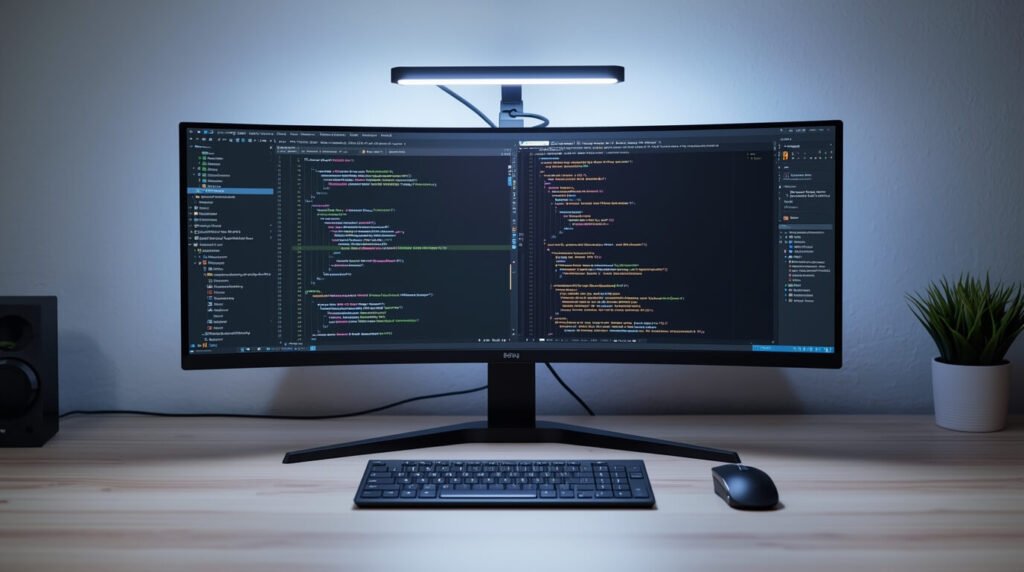
Screen real estate changes how you work. Flipping between browser tabs, spreadsheets, and Slack windows on a single laptop screen wastes time and mental energy. An ultrawide monitor (34 inches or wider) or a dual-monitor setup eliminates that problem.
For most remote workers, a single 34-inch ultrawide at 1440p hits the sweet spot. It gives you enough space to tile two or three windows side by side without squinting. If you work with code, design tools, or financial data, stepping up to a 38-inch or 40-inch ultrawide is worth considering.
Connect your monitor with USB-C if your laptop supports it. One cable handles video, data, and charging simultaneously — fewer cables on your desk means less clutter and a cleaner workspace.
7. Smart Power Strip with Energy Monitoring
This one flies under the radar, but a smart power strip is surprisingly useful for home office gadgets. You can automate your entire desk — set it to cut power to your chargers after work hours, monitor how much electricity your setup draws, and control everything with voice commands through Alexa or Google Home.
The Kasa Smart Power Strip is a popular choice. It lets you control each outlet individually, set schedules, and check energy usage through an app. At around $30, it’s one of the cheapest upgrades you can make that actually impacts your daily workflow.
8. Wireless Ergonomic Keyboard and Mouse
Your hands and wrists take a beating during long work days. A split or curved ergonomic keyboard keeps your wrists in a more natural position, reducing strain that builds up over months and years. The Logitech ERGO K860 is a favorite among remote workers — it’s split, tented, and comfortable from day one.
For mice, vertical options reduce wrist pronation (that twisting motion that causes pain). The Logitech MX Vertical and the Logitech Lift are both great choices depending on your hand size. They feel a bit unusual at first, but most people adapt within a week.
Why Wireless Matters
Cut the cords. Bluetooth keyboards and mice reduce desk clutter and give you flexibility to reposition things without wrestling with cable management. Most modern wireless peripherals last months on a single charge or a set of batteries, so you’re not constantly recharging.
9. Desk Lamp with Adjustable Color Temperature
Lighting affects both your energy and your appearance on video calls. Overhead room lights create harsh shadows. A monitor-mounted light bar or a quality desk lamp with adjustable color temperature solves this.
The BenQ ScreenBar is a popular monitor light bar that illuminates your desk without glare on your screen. Set it to warm light (around 3000K) in the evening to reduce eye strain, and switch to cooler daylight (5000K+) during morning work sessions for alertness. Research published in the Journal of Environmental Psychology has shown that lighting temperature meaningfully impacts focus and mood.
This is also one of those home office gadgets that makes an immediate difference on video calls. Front-facing light makes your face look clearer and more professional than backlit or overhead lighting.
10. USB-C Hub or Docking Station
Modern laptops are thin, which means fewer ports. A docking station gives you back everything you lost — HDMI outputs for monitors, USB-A ports for older devices, SD card readers, Ethernet for stable internet, and power delivery to charge your laptop through a single cable.
The CalDigit TS4 remains the gold standard for Thunderbolt docks, though it’s pricey. More affordable options like the Anker 575 USB-C Hub provide plenty of connectivity for most remote work setups. Just make sure whatever dock you pick supports your monitor’s resolution and refresh rate.
Frequently Asked Questions About Gadgets for Work From Home
Q: What is the most important gadget for working from home?
An ergonomic chair and a good pair of noise-cancelling headphones are the two gadgets that make the biggest immediate difference. The chair protects your body during long hours, and the headphones protect your focus. If you can only buy one thing, start with the chair — back pain from a bad seat compounds over time.
Q: How much should I spend on a home office setup in 2026?
A solid work from home setup can be built for $500-$1,500 depending on your priorities. Start with an ergonomic chair ($180-$500), add a decent monitor ($250-$400), and pick up a good headset ($100-$300). You can add a standing desk and other accessories over time as your budget allows.
Q: Are standing desks actually worth the money?
Yes, but only if you use them properly. The benefit comes from alternating between sitting and standing, not from standing all day. Most people find that switching positions every 30-60 minutes works best. A sit-stand desk with programmable presets makes this switching effortless.
Q: What gadgets help with video call quality?
Three things improve video calls the most: an external webcam (preferably 1080p or 4K), a dedicated microphone or headset with noise cancellation, and a front-facing light source like a desk lamp or monitor light bar. Upgrading just your audio typically makes the biggest difference because poor sound quality is more distracting than poor video.
Q: Do I need a docking station if I already have a USB-C laptop?
If you connect to an external monitor, need wired Ethernet, or regularly use peripherals like external drives or printers, a docking station simplifies everything. One cable connects your laptop to your entire desk setup. Without a dock, you’ll end up plugging and unplugging multiple cables every time you sit down to work.
Wrapping Up: Build Your Ideal Home Office
The right gadgets for work from home don’t have to cost a fortune, but they do need to solve real problems. Start with the basics — a good chair, a proper display, and clear audio — then expand from there. Every piece of gear on this list earns its spot by making daily remote work more comfortable, more productive, or both.
Don’t try to buy everything at once. Pick the one or two areas where your current setup is weakest and address those first. Your body and your productivity will thank you for it.